
Audit log
The Audit log lists who did what in BiblioViva: logins, changes, imports and the other recorded actions. It serves to
trace the origin of a change. It is reserved for the admin account and opens from the Audit log tab of
Administration. The rows contain no personal data of the patrons.
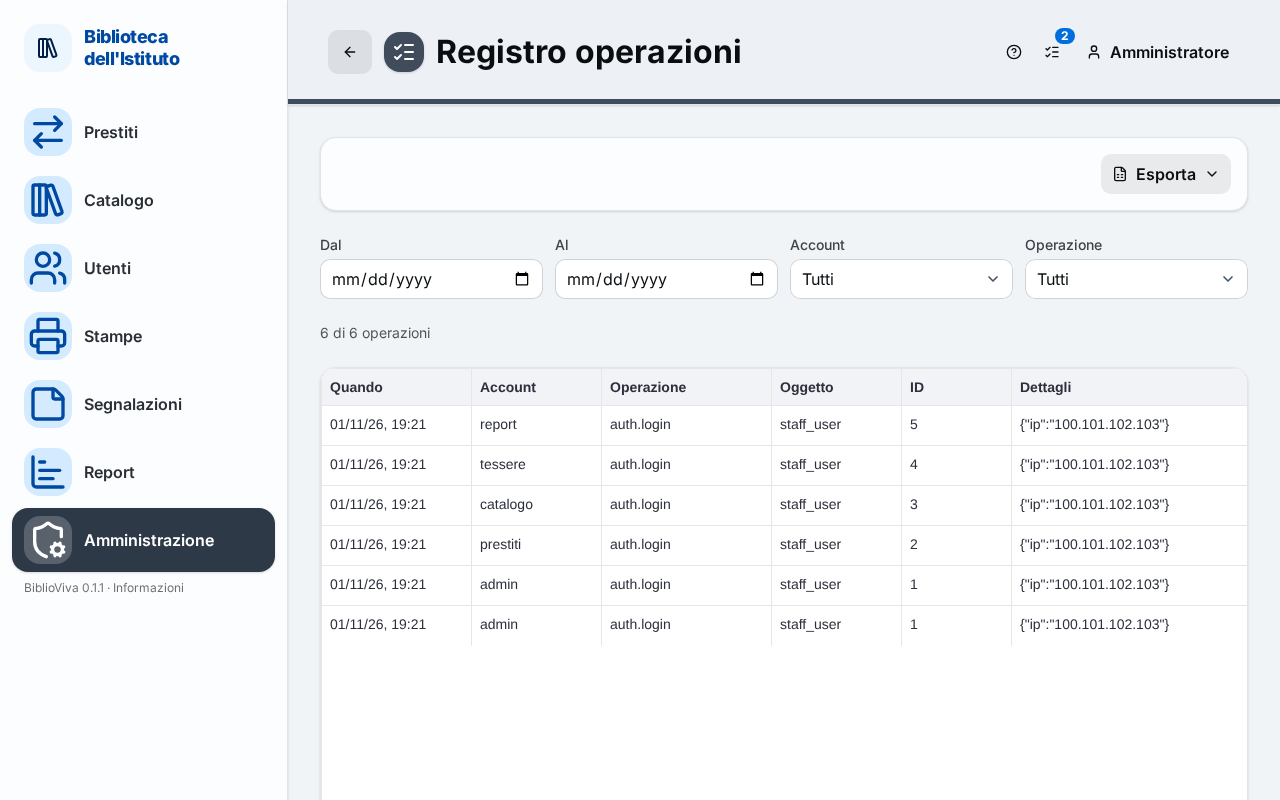
- The Export menu.
- The filters: From, To, Account and Action.
- The count of the rows shown.
- The list of actions.
Export
The Export menu downloads the list, with the filters set, in the format "CSV (spreadsheet, text)" or "ODS (LibreOffice / Excel)".
Filters
Four filters narrow the list; for each one, the All item removes the filter.
- From and To: the start and end dates.
- Account: the account that performed the action.
- Action: the type of action, for example a login or a change of the configuration.
Under the filters a line says how many actions are shown out of the total ("… of … entries"). When no action matches the filters "No entries match these filters." appears.
The list
Each row has six columns.
- When: date and time of the action.
- Account: the account that performed it; for the actions BiblioViva performs by itself (for example the nightly backup) "system" appears.
- Action: the type of action.
- Object: what was touched (a book, a patron, a section of the configuration).
- ID: the internal number of the object.
- Details: the particulars of the action, in the form in which they are recorded.
The rows older than the number of months chosen in the Months of the audit log setting (Privacy section of the Configuration) are deleted.