
Staff accounts
The Staff accounts page lists the accounts with which the staff sign in to BiblioViva, the roles and permissions that
govern them and the way people sign in. It is reserved for the admin account and opens from the Staff accounts tab of
Administration. Normally there is one shared account per role: Administration (admin), Loan management
(prestiti), Cataloguing (catalogo), Cards and photos (tessere) and Reports (report). The procedures are in
the guides Manage the staff accounts and
Change a password.
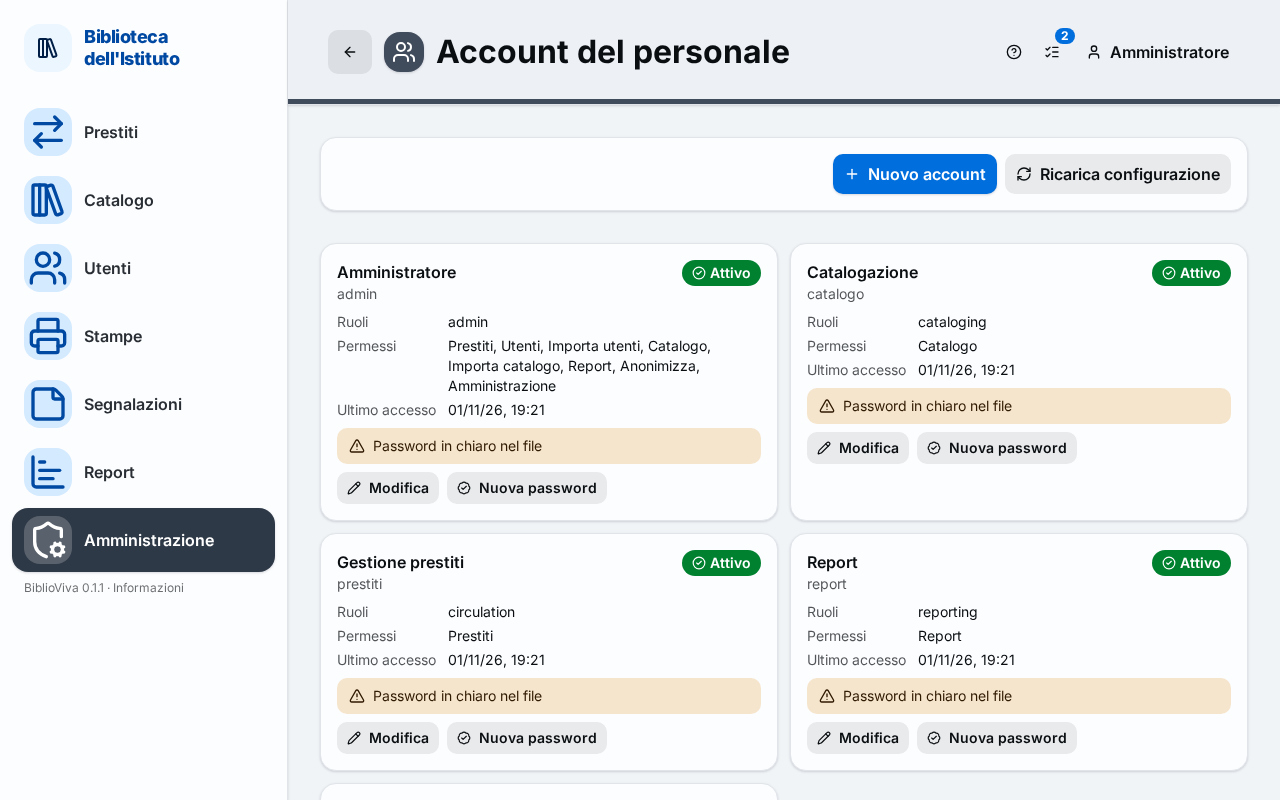
- The New account and Reload configuration buttons.
- The card of an account, with its state.
- The commands of the card: Edit, New password and Delete.
- The "Roles and permissions" editor.
- The "Sign-in" box.
- The collapsible list for whoever edits the files by hand.
New account
The New account button opens the "New account" dialog. For each account the Username (lowercase letters, digits, dot, hyphen and underscore, 2 to 32 characters), the Name shown, the Roles (at least one), the password (at least eight characters) and its repetition are given. The "Active account (can sign in)" box decides whether the account can sign in. BiblioViva does not keep the password: it writes only its hash in the configuration.
Reload configuration
The Reload configuration button re-reads the configuration files, useful when they have been changed by hand. If the
configuration is not valid the previous one stays active ("Invalid configuration: the previous one stays active"); if the
config.json file does not exist, a yellow warning says that the example configuration is in use.
The account cards
Each account has a card with:
- the name shown and, under it, the username;
- the state, Active or Deactivated;
- the Roles of the account, the Permissions that result (for example Loans, Patrons, Catalogue, Reports, Administration) and the Last login, which for an account never used says "never";
- a yellow warning when the password is written in clear in the file ("Clear password in the file") or when the account still exists in the database but has been removed from the configuration ("Removed from the configuration").
The commands of the card are three.
- Edit opens the "Edit" dialog of the account: name shown, roles and active state.
- New password opens the dialog to change the password. Whoever is signed in with that account will have to sign in again.
- Delete appears only on deactivated accounts. It asks for confirmation ("Delete …?"): the account leaves the configuration, the actions it performed stay in the Audit log under its name, and the deletion can be undone from the Configuration history.
Some actions are refused with a message: at least one active account must keep the administration permission; a username already in use cannot be repeated; an account must be deactivated before it is deleted.
Roles and permissions
The "Roles and permissions" editor shows one row per role and one column per permission. A role is a set of permissions; every account has one or more roles. The permissions are:
- Loans;
- Patrons;
- Import patrons;
- Catalogue;
- Import catalogue;
- Reports;
- Anonymize;
- Administration.
The "Everything" permission grants them all, even those that will come with later versions. Under the name of a role used by no one "no account" appears. The commands are Add a role, Save and Discard changes. Renaming a role updates the accounts that use it; a role used by an account cannot be deleted.
Sign-in
The "Sign-in" box explains how people sign in. With the accounts of the configuration, the normal case: "People sign in with the accounts of this page, usually one shared per role". There are no personal accounts, one per person.
Generate password hash
The collapsible list "For whoever edits the files by hand: hash a password" holds the Generate password hash tool. A
password is entered (at least eight characters); after Generate hash is pressed the "Hash to paste" appears, for the
passwordHash field of the file; Copy puts it on the clipboard. The password is not saved.