
Classes
The Classes page lists the classes of the school, each with its years and the number of patrons, and the teachers'
groups. Classes are stable groups: the class upgrade moves them up a year (3 B becomes 4 B). The page
is reserved for the admin account and opens from the Classes tab of the Configuration; whoever
manages the patrons only picks a class among the existing ones. The procedure is in the guide
Set up the classes.
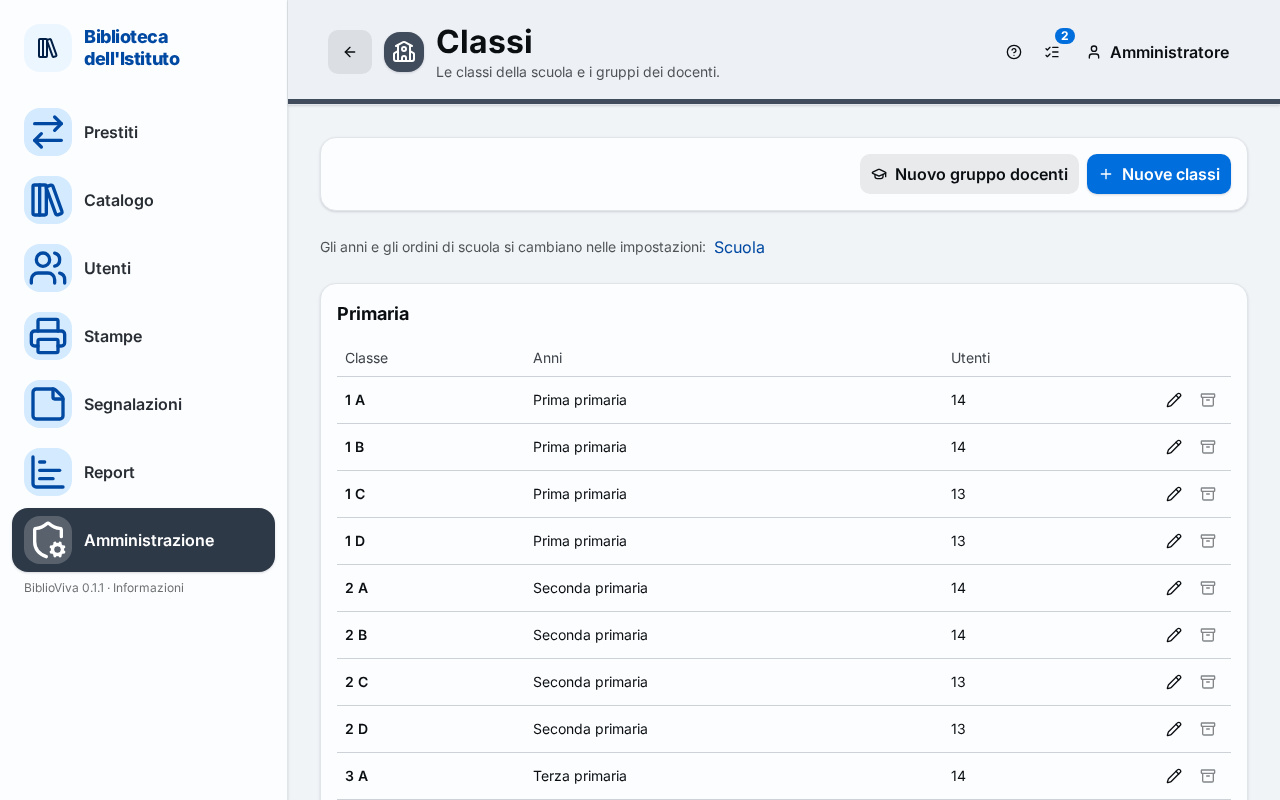
- The New teachers group and New classes buttons.
- The School link, to change the years and stages of the school.
- One table per school stage, with the Class, Years and Patrons columns.
- The commands of a row: Edit and Archive.
- The teachers group.
- The collapsible list of the archived classes.
New classes
The New classes button opens the dialog of the same name, which creates several classes at once. The
Years (one or more) are chosen and the Names of the classes written, separated by commas; A-D stands for A, B, C, D and a
name may contain spaces. The box "One mixed-year class with every year chosen" creates a single class that hosts all the
chosen years, marked in the list by the Mixed-year class label. At the bottom the dialog shows the preview of the
classes that will be created ("… classes to create"); until there is at least one year and one name "Pick at least one
year and type the names." appears. The Save button creates the classes.
New teachers group
The New teachers group button opens the dialog of the same name: a teachers group has no years, only a Name and the Notes. The group appears in the Teachers box.
The School link
Under the title the sentence "The years and stages of the school are changed in the settings" points with the School link to the School section of the Configuration.
The class tables
The active classes are grouped by school stage, with the name of the stage as the title; a mixed-year class appears under the stage of its first year. For each class the table shows the name (with any notes), the Years it hosts and the number of Patrons. With no classes the page says "No classes" and says that classes are created with New classes.
- Edit opens the "Edit" dialog of the class: name, years, school stage (Stage, with the All item) and Notes. A year cannot be removed while students of the class are still in it.
- Archive takes the class off the list. The command is off, with the hint "It still has patrons: it cannot be archived", while the class has patrons.
Archived classes
The collapsible list "Archived classes" holds the archived classes, in a table like the others. Restore brings a class back among the active ones.
Messages
The page may refuse an operation with these messages.
- "The name is required." and "The name is too long (40 characters at most)."
- "Pick at least one year." and "A chosen year no longer exists."
- "A teachers group has no years."
- "A class with this name already exists for the same year."
- "Some students of the class are in a year that would be removed."
- "The class still has patrons." and "The class no longer exists."