
Add a copy to a book already in the catalogue
This guide explains how to add one or more copies to a book that already has a record, for example when the library receives a second copy or a gift of the same title. It is for whoever catalogues the books.
- Time: about 1 minute.
- Account: "Cataloguing" (also "Administration").
- Requirements: the book and, for the first method, the USB barcode scanner.
Each copy has a code of its own, generated by BiblioViva, and a label of its own. The record of the book (title, author, classification) stays a single one and is not written again.
Procedure
Add the copy by reading the ISBN
-
Open Catalogue and press New book.
-
In Material choose the type of the copies, if it is not the one already selected.
-
Read with the scanner the ISBN barcode. BiblioViva finds the record already in the catalogue and shows "This ISBN is already in the catalogue", with the title and the number of copies the book already has.
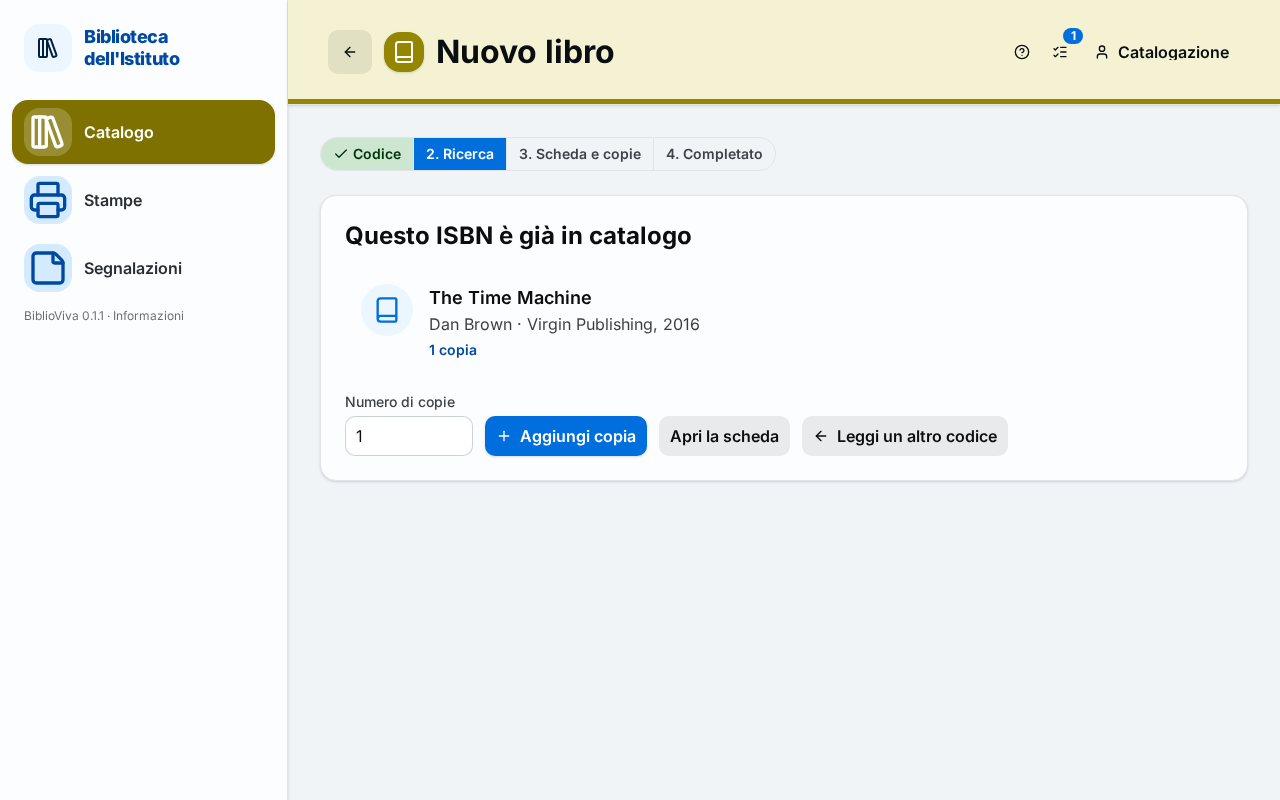
Figure 1. The New book page facing an ISBN already in the catalogue -
Write in the Number of copies field how many copies are added.
-
Press Add copy. The confirmation opens, with the summary "N copies added to …" and the Copy barcodes. The Call number of the new copies is suggested from the classification of the book.
-
To go on press Add another (the next book), Print labels or Open the record.
Add the copy from the record of the book
This method is for a book without an ISBN or when the call number, the level or other data of the copy need to be changed.
-
Open Catalogue and search for the book, see Find a book. Open its record.
-
Press Add copies. If the browser window is narrow the button is in the menu of the other actions at the top. The "Add copies" window opens.
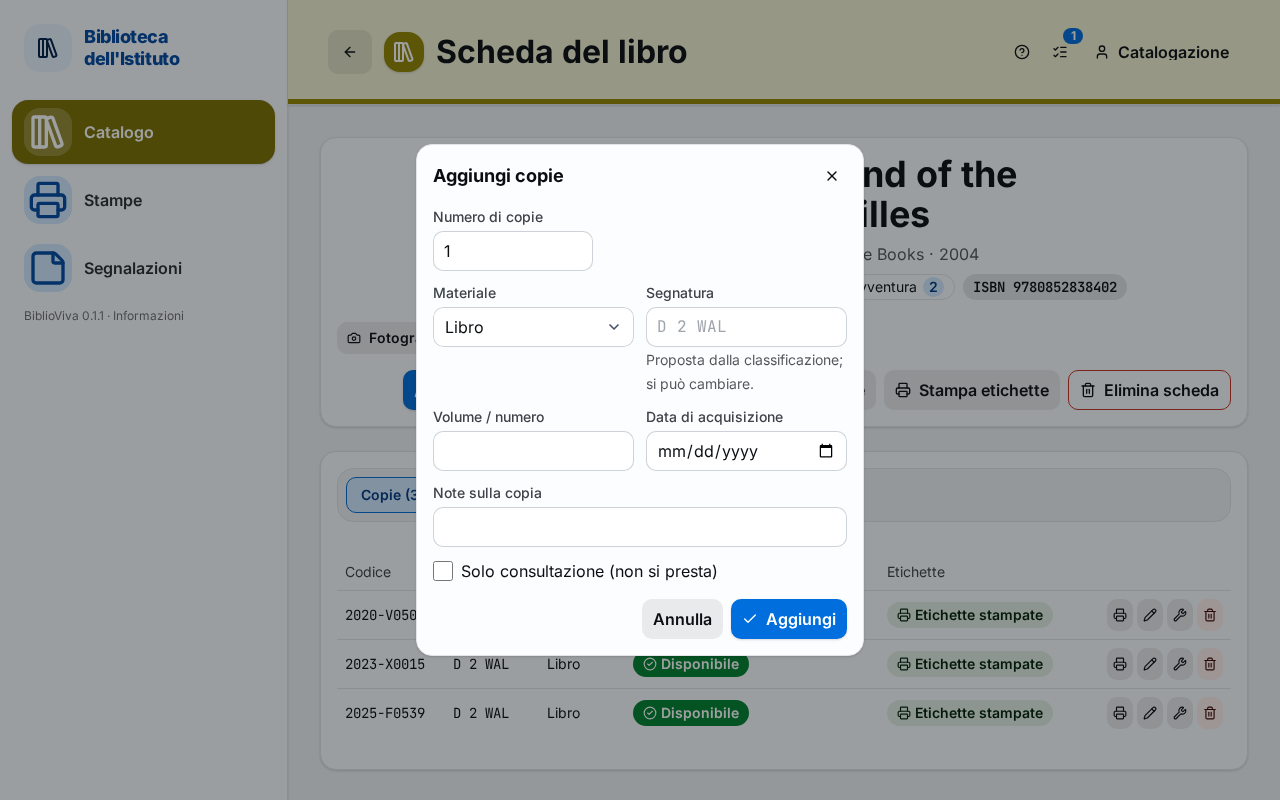
Figure 2. The Add copies window on the record of a book -
Write the Number of copies (from 1 to 100).
-
Choose the Material of the copy.
-
Leave the Call number empty to use the one suggested from the classification (the suggestion is shown in grey in the field), or write a different one. The call number is the code that says where the book goes on the shelf, for example
B 4 DELor590 ROS. -
If the library assigns the reading level to each copy, choose the Level of the copy.
-
If the book is in several volumes, write the number in the Volume / number field.
-
Check the Acquisition date and, if needed, write a note in Notes on the copy.
-
If the copy must not leave the library, for example a volume to consult on the premises, tick Reference only (not lent).
-
Press Add. A notice confirms "N copies added" with the assigned codes, and the copies appear in the Copies tab.
-
To print the labels press Print labels at the top of the record, or the printer icon on the row of the copy, see Print book labels.
Result
The record of the book shows the additional copies, each with its code, its call number and the status Available. The number at the top, "N available of M", includes the new copies. The Labels column says Labels to print until the labels are printed.
Possible problems
- The book already has a record but it is not found by reading the ISBN: the record was written without an ISBN, or with a different ISBN (another edition). Search for it by title in Catalogue and use the second method.
- "1 to 100 copies at a time" appears: the number of copies is out of bounds. Add fewer copies at a time.
- The record is marked "To classify": the copies are added all the same, but they are not lent and have no call number until the book is classified, see Classify books.
- The copy added belongs to a book in several volumes: add one copy at a time, writing the number in Volume / number.
- A copy was added by mistake: a copy that was never lent is deleted from its row with the trash icon, which asks for confirmation; a copy already lent is removed as in Withdraw a lost or damaged copy.