
Catalogue a book without an ISBN
This guide explains how to add to the catalogue a book that has no ISBN, for example an old book, a comic, a book made by the school or a DVD: the record is searched by title and author or written by hand. It is for whoever catalogues the books.
- Time: 2 to 5 minutes per book.
- Account: "Cataloguing" (also "Administration").
- Requirements: the book, with the title page in front to copy title, author and publisher; the Internet connection of the BiblioViva computer for the search by title; the USB barcode scanner for a DVD that has an EAN code.
A book without an ISBN has no barcode of its own that BiblioViva can read at the desk. Each copy receives a code from BiblioViva, which is printed on a label to stick on the book: see Print book labels.
Procedure
Search the record by title and author
-
Open Catalogue and press New book.
-
In Material choose the type of material, if it is not the one already selected.
-
Press No code. The page "Search by title and author" opens.
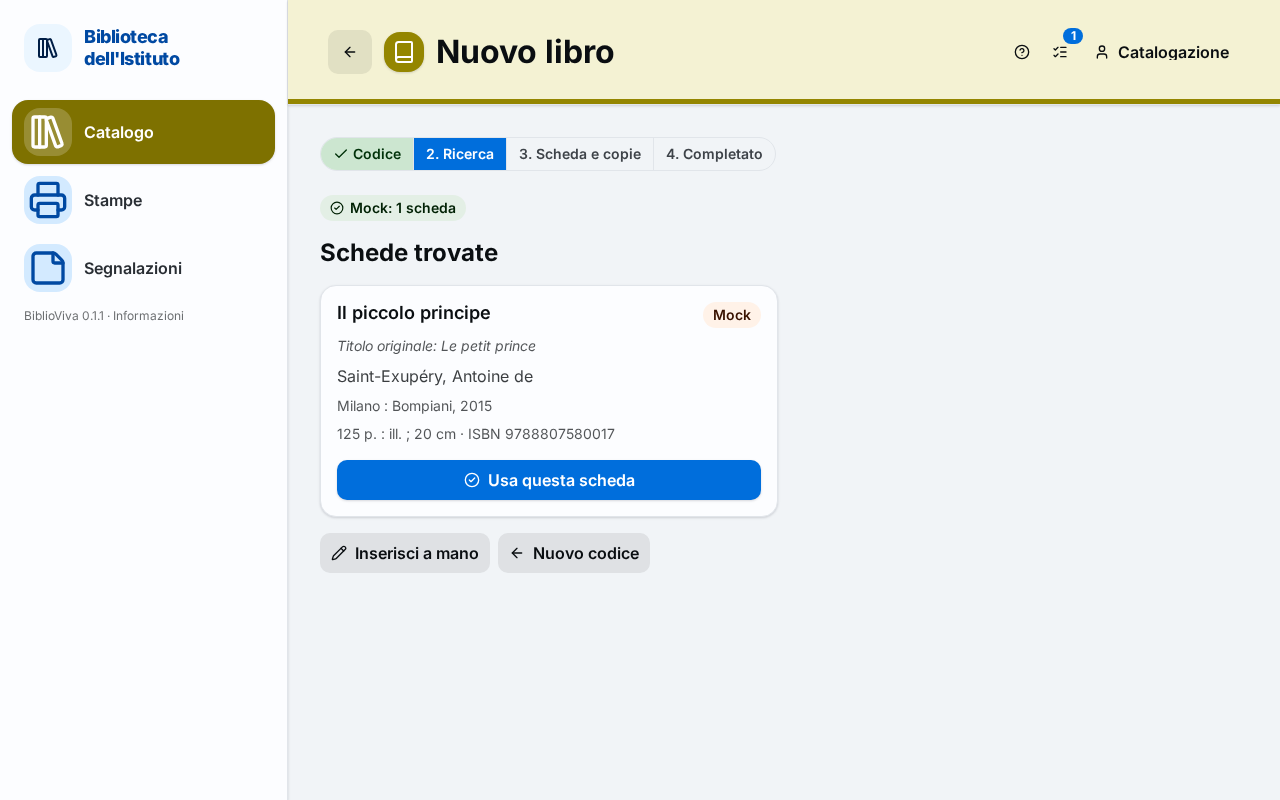
Figure 1. The search by title and author of the New book page -
Write the Title, the Author or both, then press Search. One of the two fields is enough: if both are empty, "Type at least the title or the author." appears.
-
Wait for the Records found list. The records are in order of completeness: the first one carries the label Most complete. Each record shows title, author, publisher, year and description.
-
Compare the record with the book in hand (year, publisher, number of pages) and press Use this record on the right one. The Record and copies form opens with the data already written.
-
Go on from the check of the data as in Catalogue a new book: series, classification, copies, Save record and copies.
Fill in the record by hand
When no record matches the book, or the list is empty, the record is written by hand.
-
Press Fill in by hand on the page "Search by title and author". From the list of the records found the same button is called Enter by hand. The form opens, with the notice "Record filled in by hand.".
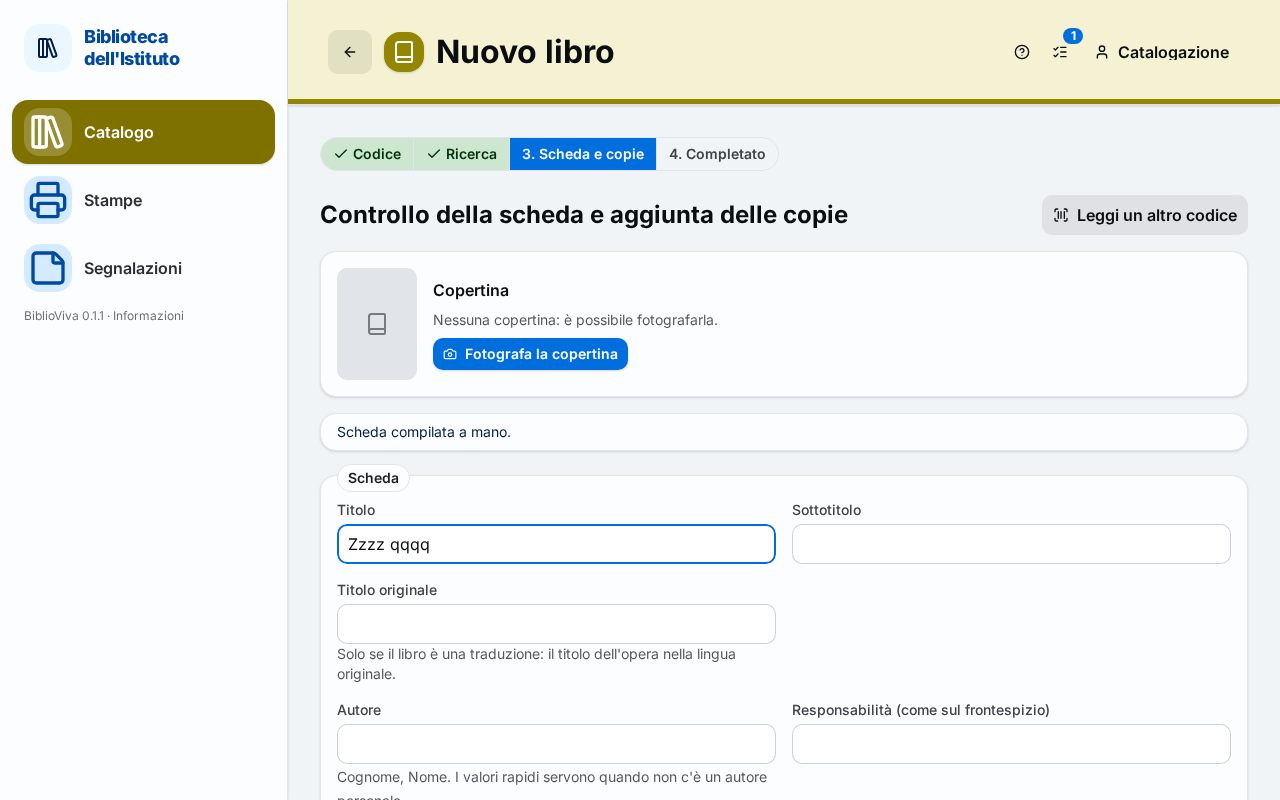
Figure 2. The form of the record filled in by hand -
Write the Title, as on the title page. Write the Subtitle only if there is one.
-
If the book is a translation, write in Original title the title in the original language.
-
Write the Author as "Surname, Name". Without a personal author press "Anonimo" (unknown author) or "AA. VV." (work by several authors).
-
Write the Publisher. If it is unknown press "s.n." (no name). Write the Place if it is known, otherwise press "s.l." (no place).
-
Write the Year of publication with four digits. With an unknown year leave the field empty.
-
Write in the Physical description pages, illustrations and size, on a single line (for example "120 p. : ill. ; 24 cm").
-
If the book belongs to a series, write Series and Number in the series.
-
Choose the classification and write the copies as in Catalogue a new book, then press Save record and copies.
DVDs and other material with an EAN code
- Open New book and choose in Material the right type, for example DVD.
- Read with the scanner the barcode of the case. BiblioViva recognises that it is an EAN and not an ISBN: it skips the lookup, opens the form and writes the code in the EAN (not an ISBN) field, with the notice "EAN … read: it is not an ISBN, so the record must be filled in by hand.".
- Fill in the record as described above and press Save record and copies.
Result
The book has a record and one or more copies with the barcode generated by BiblioViva. The next step is to print the labels and stick them on: until the book has the code on its cover, it cannot be read at the circulation desk.
Possible problems
- The search by title finds nothing: "No record found. The record can be filled in by hand." appears. Try with fewer words or with the author's surname only (press New code and repeat No code), or fill in the record by hand.
- "The service cannot be reached…" appears: the BiblioViva computer cannot reach OPAC SBN. Press Retry or fill in the record by hand: data written by hand are as valid as those found.
- Saving says "Implausible year": the year is not a number between 1450 and next year. Correct it or leave the field empty.
- Saving says "Invalid ISBN (check the digits)": the book has an ISBN but it was written wrongly. Read it again with the scanner or correct the digits in the ISBN field.
- Author and publisher are missing: they are mandatory. Use "Anonimo", "AA. VV.", "s.n." or "s.l.", which BiblioViva recognises as allowed values.