
Returns
The Returns page is used to register the books that come back to the library. The barcode of each book is read with the scanner: the return is registered at once, without reading the patron's card. The page is opened by the accounts that have the loans permission ("Loan management" and "Administration"), with the Returns tab of the circulation desk, with the Returns button of the dashboard or from the messages of Loans that offer Go to Returns. For the step-by-step procedure see Return a book.
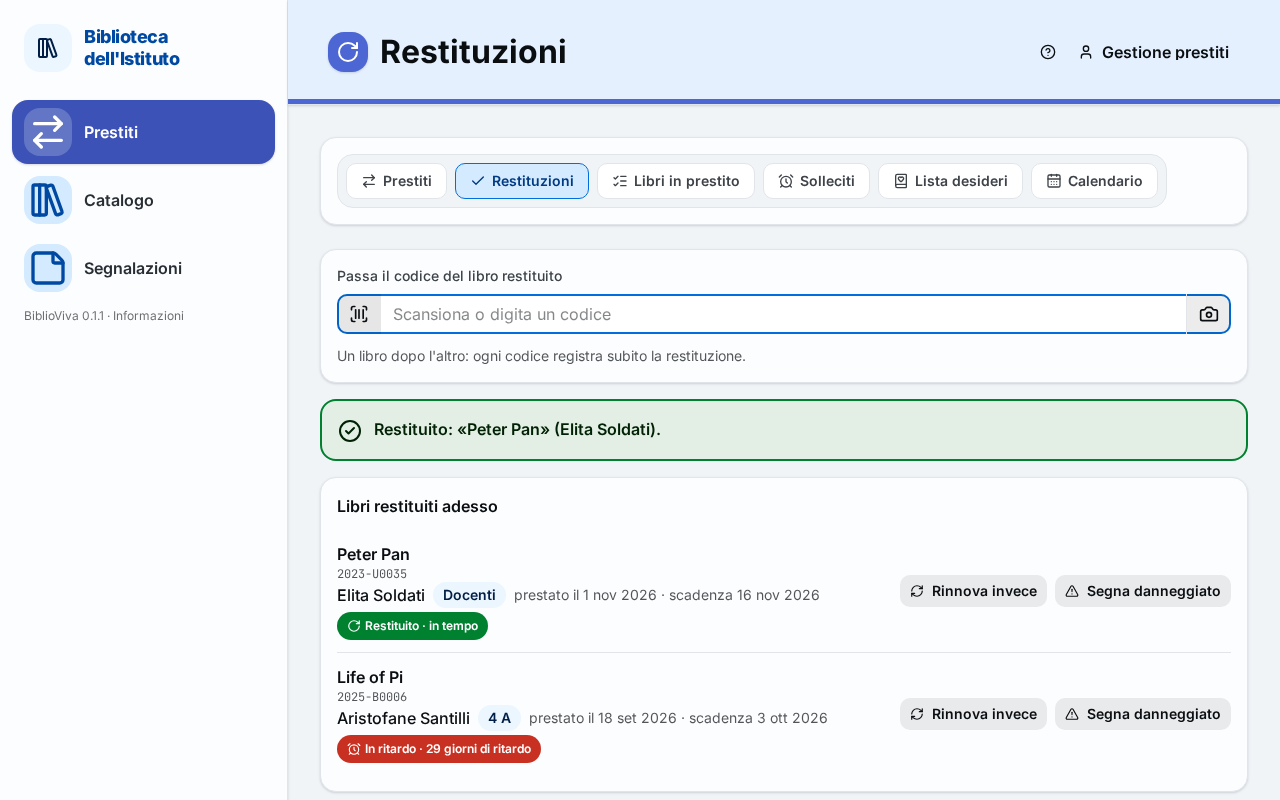
- Code field.
- Desk messages: the result of the last scan.
- Books returned now.
- Buttons on each row.
Code field
The field is called Scan the barcode of the returned book, with the hint "One book after the other: every barcode registers the return straight away." It stays ready after every scan: a pile of books is registered by reading one code after the other, without touching the keyboard or the mouse. The code is read with the barcode scanner, which also sends the Enter key, or it is typed by hand followed by Enter.
The Camera button next to the field reads the code with the phone's camera. It is optional and works only if BiblioViva is opened over a secure connection (https, that is with Tailscale).
When the page is opened from a message of Loans with the Go to Returns button, the field already contains the book's code: the return is registered only by pressing Enter, never by itself (see Code waiting).
Desk messages
Under the field appears the result of every scan. Every message says what happened and what to do, has a colour, an icon and the text (colour is never the only sign) and, when needed, one or more buttons. Red: the operation was not done; yellow: to be checked; light blue: information; green: operation succeeded. The desk makes no warning sounds.
The messages are described below, each with its exact text. In the texts, <title>, <name>, <date> and the like
stand for the real data; long titles are shortened to 40 characters. Lateness is only information: it changes nothing
for the patron.
Confirmations
Return registered
Returned: “
<title>” (<name>).
The book was on loan and was on time: it is now available and appears in Books returned now. No action is required: scan the next book.
Late return
Returned. “
<title>” was<n>days overdue (due<date>).
The book was registered as returned, but the due date had passed. The message is yellow, with the Mark damaged button (see Copy marked as damaged) to use if the returned book is damaged. If the patron has other overdue books, Print a reminder appears in the row.
Lost book found
“
<title>” was marked as lost: it is available again.
The book had been marked as lost and has now come back. It appears together with "Returned…" if the book was also on loan, alone if it was not. BiblioViva has already put it back among the available books. Press Confirm to close the message.
Copy marked as damaged
“
<title>” is marked as damaged: it can still be lent.
Confirms Mark damaged: the copy now has the status "damaged", visible in the book's record, but it can still be lent. To take it out of lending see Withdraw a lost or damaged copy.
Renewal instead of return
Renewed instead of returned: “
<title>”, new due date<date>.
Confirms Renew instead: the patron wanted to keep the book. The row shows "renewed until <date>" and its buttons
disappear. The book does not count as returned.
Code waiting
Press Enter to register the return of the book
<code>.
Appears when the page was opened from Loans with the code already in the field. The return is not registered yet: press Enter to confirm it.
Scans to explain
Book not on loan
“
<title>” is not on loan: there is no return to register. If it was lent without registration, the book is available anyway.
The code belongs to a copy that has no open loans: for example it was lent without reading the card, or it came back several times. The message is informative. No action is required: the book is available and can go back on the shelf.
Book already returned today
“
<title>” was already returned today at<time>.
The same copy was read a second time in the day, usually through distraction. Nothing new was registered. No action is required.
Card scanned instead of a book
This is a card (
<name>), not a book. Only returns are registered here: for a loan open Loans.
The code of a card was read. If the patron wants to take a book, press Go to Loans with this patron: Loans opens with the patron already chosen. If books were being returned, read the book's code.
Card and copy code together
Code
<code>matches both a card (<name>) and a book (<title>). Choose which one.
Some old numbers, preceding the current format of the codes, are the same for a card and for a copy. Press Book to register the return of the copy, or Card to treat the code as a card: the message Card scanned instead of a book appears.
Code not found
Code
<code>not found. Check that the scanner read it correctly or type it: book codes look like<copy example>, card numbers like<card example>.
The code matches no card and no copy; the message shows the form of the library's codes. Press Try again to scan again, or type the code; to look for the book by title press Search by title, which opens the catalogue. If the book has no readable label see Lend or return a copy without a label.
Code with a wrong check character
Code
<code>looks mistyped (the check character does not match). Scan it again or type it.
The last character of the code does not match: usually the label is dirty or the scanner misread. Press Try again and scan again. A notice also appears under the field: "The copy barcode has a wrong check character: scan it again."
Refused renewal
If Renew instead is not allowed, one of the three following messages appears in place of the confirmation, without buttons: the book stays returned and the row does not change.
Renewal limit reached
“
<title>” has already been renewed<n>times, the maximum. It must be returned.
The book has already been renewed as many times as the rules allow. No action is required: the return is already registered.
Renewal blocked by lateness
“
<title>” is<n>days overdue and the rules do not allow a renewal.
The rules do not allow renewing a book that is already overdue. The return stays registered.
Renewal beyond the latest due date
“
<title>” cannot be renewed: it is already due on<date>, the last loan day of this year.
A renewal would exceed the latest date for loans. The return stays registered.
Books returned now
The Books returned now section lists the books registered since the page was opened, the last one on top. While it is empty: "Scan the barcode of the returned books." Each row shows:
- the code of the copy and the title;
- the name of the patron who had the book, the class (Teacher for teachers) and the dates, "lent on
<date>" and "due<date>"; - a coloured sign with text: "on time" (green), "
<n>days late" (red) or "renewed until<date>"; with the sign "Damaged" if the copy was marked as such.
The list is not saved: reloading the page empties it. Returned loans stay, however, in the history of the patron and of the book.
Buttons on each row
- Print a reminder: appears if the patron still has other overdue books; opens the printable reminder in a new tab. See also Print the overdue notices.
- Renew instead: for the case of the patron who wanted to keep the book. Renews the loan just closed; results in Renewal instead of return and Refused renewal.
- Mark damaged: marks the copy as damaged; result in Copy marked as damaged. After it is used the button disappears.