
Remove a patron
This page explains how to remove from the archive a student or a teacher who no longer attends the school. The removal erases the personal data at once and for good: it cannot be undone. It is for whoever has the permission to remove patrons, normally the administrator only.
Warning. The removal is immediate and irreversible. First name and surname, email, student id, notes, card number and photo are erased and there is no way to recover them. Only the type (student or teacher), the class and the loan history stay, which serve the statistics and no longer show who the person was.
- Time: about 2 minutes.
- Account: Administration. The permission to remove patrons is normally not part of the "Cards and photos" account: if the button does not appear, log in with the "Administration" account.
- Requirements: no open loans in the patron's name. The books must first be returned at the circulation desk, or marked as lost: from the patron's record with the "Administration" account (the loans permission is needed together with the patrons permission), or by changing the status of the copy, as in Withdraw a lost or damaged copy.
- To remove at once all the students who have left the school there is the synchronisation with the school's list: see Import the students.
Procedure
Check the open loans
- Log in to BiblioViva with the "Administration" account.
- Open Patrons.
- Write at least three letters of the surname in the Search by surname… field and press the patron's row. The Patron record opens.
- Open the Open loans tab. If it is empty, it says "No open loans." and the removal can go ahead.
- If there are books on loan, have them returned at the circulation desk. A book that does not come back is marked as lost with Mark lost, followed by the title, and then Mark lost in the confirmation window.
Remove a patron
-
In the Patron record press Remove student (for a teacher Remove teacher). If the buttons do not all fit in the row, the command is in the More actions menu.
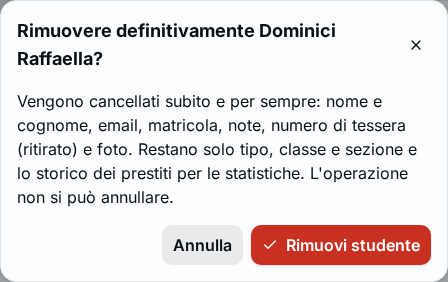
Figure 1. The confirmation window Remove for good, with the notice about the photos in the class pictures -
Read the "Remove … for good?" window. If the patron had been chosen for photos in a class picture, the window says so and warns that those frames are covered.
-
Press Remove student (or Remove teacher) in the window. The notice "Patron removed: personal data erased." appears.
Remove several patrons together
- Open Patrons and use the filters to show the patrons to remove, for example a class.
- Select the rows by holding down Ctrl, or Shift for a range, while pressing on the row.
- Press Remove selected. The "Remove N patrons?" window opens, which repeats which data are erased.
- Press Remove selected in the window. The notice says how many patrons were removed and how many, still having open loans, were kept in the archive.
Result
The patron's record shows the Removed mark and the text "Removed on …. Only the data for statistics remain.". First name, surname, contacts, card number and photo no longer exist. The patron's card is no longer valid. In the class pictures used for the census the patron's frame is covered and its file is deleted, while the picture stays with the class. Removed patrons can be found in Patrons by choosing the Status → Removed filter.
Possible problems
- "Has N open loans: they must be returned or marked lost first.": the patron still has books. Return them at the circulation desk or mark them lost, then repeat the removal.
- The Remove student button is missing: the account does not have the permission to remove patrons. Log in with the "Administration" account.
- Removing several patrons: patrons with open loans are not removed and stay in the archive, with no message for each of them. The final number of the notice counts them.
- The wrong patron was removed: there is no way to undo it. If the student still exists they can be entered again as a new patron, with a new card number: see Enrol a student. The past loans do not come back in their name.
Related pages
- Edit a patron's data
- Return a book
- Upgrade the classes, for the students who have finished school
- Patron record