
Books on loan
The Books on loan page shows all the books that are outside the library at this moment, with the patron who has them, the due date and the days of lateness. It is used to find a loan (who has a certain book? what does a class still have?), to renew several loans together and to export the list. The page is opened by the accounts that have the loans permission ("Loan management" and "Administration") from the Books on loan tab of the circulation desk or from the Open loans tile of the dashboard. For the step-by-step procedure see Check the books on loan.
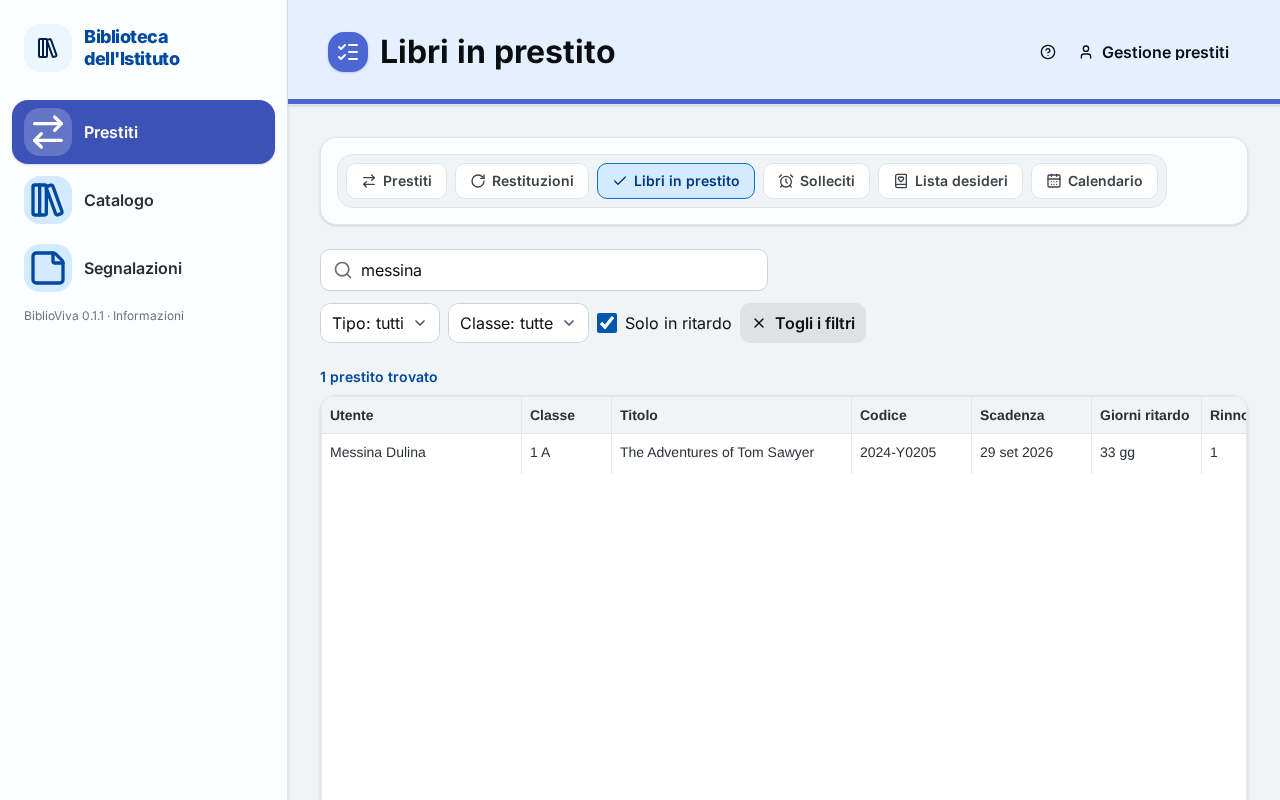
- Search and filters.
- Start page: until something is searched.
- List of loans.
- Renewing the chosen loans.
- Export.
Search and filters
At the top are the search field and the filters:
- Search by surname or book barcode: the field searches among the patrons and the codes of the copies. For a name at least three letters are needed; a code can be searched with a few digits.
- Type: all, Students or Teachers.
- Class: all or a class from the list.
- Overdue only: shows only the loans that are past due.
- Clear filters: appears when at least one filter or a search is active and resets them.
The browser remembers the search and filters: going back from another part of the program the list is found as it was.
Start page
As long as there is neither a search nor a filter, in place of the list appears the tile Search the books on loan
with the text "<n> books on loan. Search by the patron's name, a book's code or with the filters." The list does not
load by itself because, with thousands of loans, it would be long to scroll; to see all the loans choose a filter, for
example Students, then Teachers.
List of loans
After a search or a filter, above the table appears the number of results: "<n> loans found". Without results: "No
open loans." The table has one row per loan and these columns:
| Column | Content |
|---|---|
| Patron | surname and first name |
| Class | the patron's class; Teacher for teachers |
| Title | the title of the book |
| Barcode | the code of the copy |
| Due | the date on which the book must come back |
| Days late | "<n> d" for overdue loans, empty for the others |
| Renewals | how many times the loan has been renewed |
| Last notice | when the last overdue notice was printed, if there was one |
The columns Patron, Class, Title and Days late are sorted by pressing the header. The column Lent on, with the date of the loan, is in the export but not in the table.
Pressing a row opens the patron's record (Patron record), but only for accounts that have the patrons permission: the "Loan management" account cannot open patron records and pressing the row does nothing.
Renewing the chosen loans
Selecting one or more rows with the checkbox at the start of the row, in place of the filters appears "<n> selected"
with the Renew selected button. The button renews the chosen loans, one after the other, and under the bar appears
the summary "<n> of <total> loans renewed.", followed, for each refused renewal, by the reason, with the buttons
Return and, for the administrator, Force (admin only). The reasons are explained in
Refused renewals of Loans.
Export
Under the table the Export menu downloads the list shown (with the active search and filters) as a CSV file, for a spreadsheet, or ODS, for LibreOffice or Excel. The file also contains the date of the loan.