
Record a wished-for book
This page explains how to note on the wishlist a book that the library does not have and that someone would like to read, so that whoever looks after the catalogue knows what to buy. It is for staff at the circulation desk using the "Loan management" account, or for those who catalogue with the "Cataloguing" account.
- Time: about a minute per wish.
- Account: "Loan management", "Cataloguing" or "Administration".
- Requirements: at least the title, the author or the series of the book. The name of whoever asked for it is also useful.
Procedure
-
Open Wishlist from the tabs at the top ("Loan management" finds it in the circulation desk, the "Cataloguing" account among the catalogue pages).
-
In the New wish form write the Title, the Author or the Series (one of the three is enough).
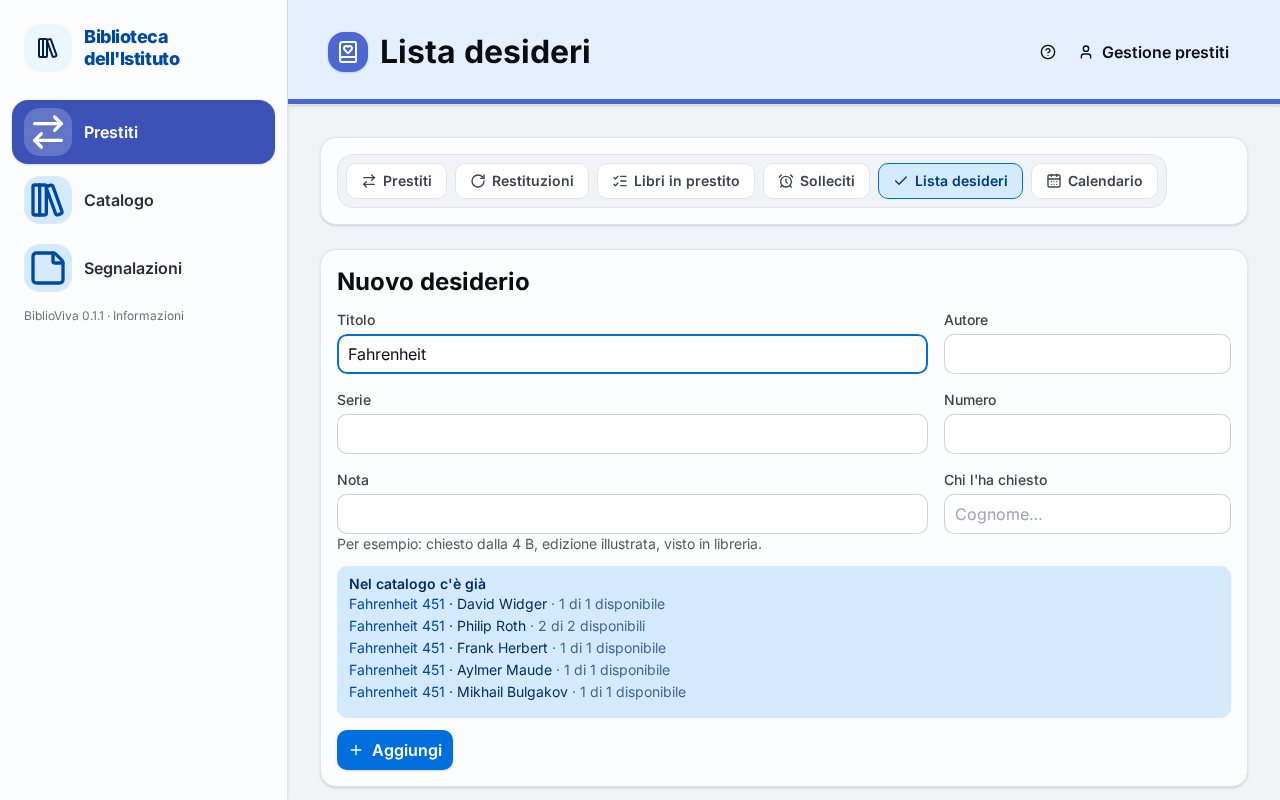
Figure 1. The wish form with the similar books already in the catalogue and on the list -
If the book is part of a series, write the Number in the series. While typing, the Series field suggests the series already in the catalogue.
-
Look at the notice that appears after three letters:
- Already in the catalogue lists similar books with the number of copies available. If the book is there, there is no need to record the wish: open the book and lend it.
- Already on the list lists similar wishes already noted. If it is the same book, press +1 request next to that wish, instead of adding another.
-
Write in the Note what the buyer needs, for example the class that asked for it or the edition.
-
With the "Loan management" or "Administration" account, fill in Asked by: type the patron's surname, at least three letters, and choose the patron from the list. To remove it press Remove.
-
Press Add. A message says Wish added; if the book was already on the list, it says instead that a request was added.
Correct a wish
- Click the wish's row in the list. The form opens with Edit the wish.
- Correct the fields and press Save the changes. To give up, press Cancel.
Search, sort, count the requests
- Type in the Search title, author, series or note field to find a wish.
- Choose with Sort among Most recent, Most requested, Title and Author.
- To add a request to one or more wishes, select them with the box and press +1 request.
- To remove from the list the wishes already satisfied or mistaken, select them and press Delete. The confirmation window says how many wishes leave the list; the operation cannot be undone.
- To save the list in a spreadsheet, press Export under the table.
Result
The wish appears in the list with the number of requests. The "Cataloguing" account uses it to decide purchases; when the book is recorded, the wish leaves the list by itself.
The list shows the Asked by column and the Asked by field only to the accounts that work with patrons ("Loan management" and "Administration"). The "Cataloguing" account does not see them: it reads the wishes and the requests, but does not know who made them.
Possible problems
The page asks for at least one detail
The form is not saved without a title, an author or a series: write at least one of the three.
The book was already on the list
The wish is not duplicated: the page adds a request to the existing one and says so with a message. In this way the Most requested sort shows the most wished-for books.
The book is already in the catalogue, but all the copies are on loan
The notice shows "0 of N available". The book does not need to be bought for this: it is enough for the patron to wait for the return.
A field is too long
The message says that a field is too long: shorten the text, in particular the Note.
Catalogue the wished-for book
With the "Cataloguing" account, select a single wish and press Catalogue it: New book opens with the wish already written. When the record is saved, the wish leaves the list. See Catalogue a new book.