
Notes
Notes are coloured slips with which people working in the library leave a notice for colleagues and for the administrator: "The desk scanner does not read the cards", "The label paper has run out". They are read and written by all accounts; only the administrator archives them and pins them to the dashboard. The page is opened with Notes in the side menu (on the phone under More) or with the Open the notes button of the pinned notes. For the step-by-step procedure see Leave a note for colleagues.
The page has two tabs: Open and Archived.
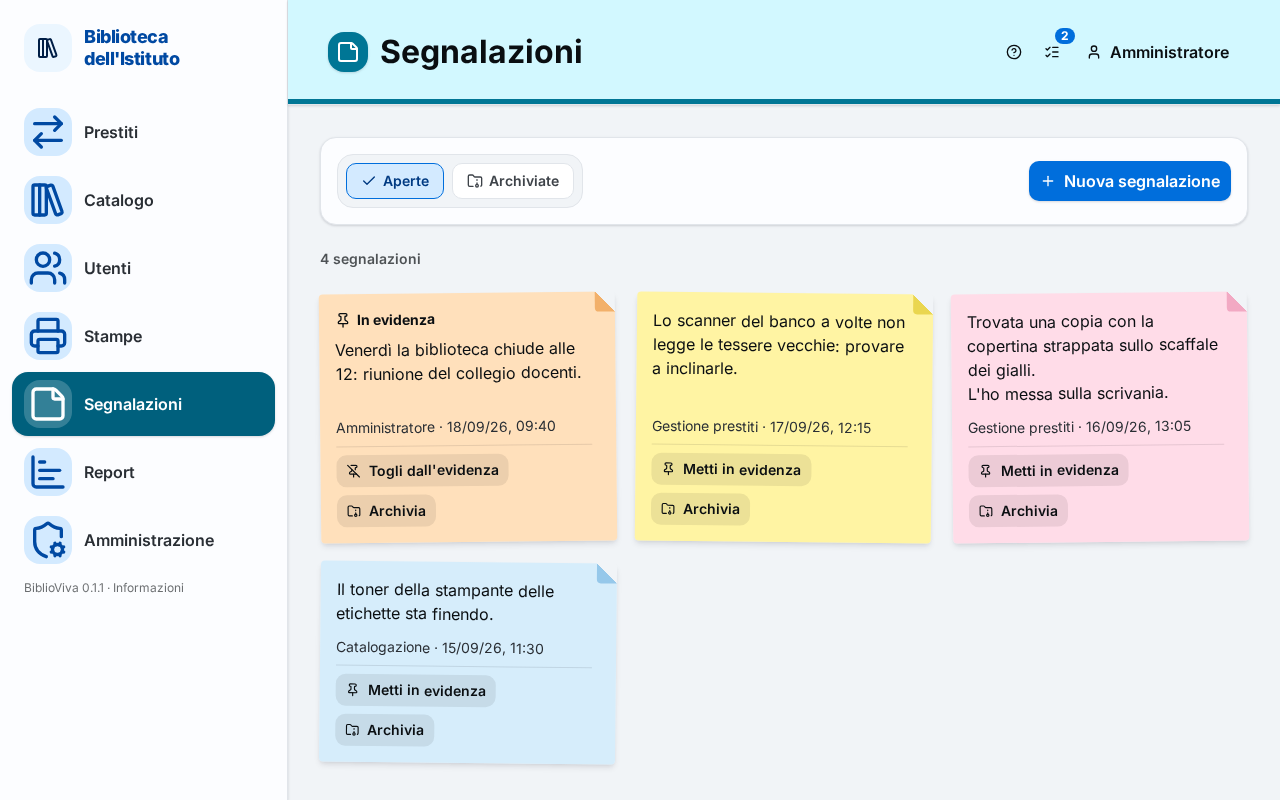
- New note button.
- Open and Archived tabs: Open notes and Archived notes.
- Slip: text, author, date and the administrator's buttons.
Open notes
The Open tab shows the slips that are still valid, the pinned ones first. Above the slips: "<n> notes". Without
notes: "No open notes", with the New note button. To accounts that are not administrators the page reminds: "Only
the administrator archives notes and pins them to the dashboard."
Slip
Each slip shows:
- Pinned, with the pin, if the administrator has pinned it to the dashboard;
- the text, with line breaks; a long text is shortened and opens with Show all (and closes again with Show less);
- the account that wrote it and when ("
<account>·<date and time>"); - in archived notes, also who archived it and when ("Archived by
<account>·<date and time>").
A note cannot be edited. In case of a mistake, ask the administrator to archive it and write another one.
The administrator also sees two buttons on the slip:
- Pin to the dashboard / Unpin: the note appears at the top of the dashboard (and at the top of Loans for whoever opens the desk directly) until it is unpinned or archived. "Note pinned" or "Note unpinned" appears.
- Archive: moves the note to the Archived tab. "Note archived" appears.
New note
The New note button opens a window with these fields:
- Text: the text of the note (hint: "E.g. The desk scanner does not read the cards."), up to 500 characters; next
to the field a counter shows "
<n>/500". If the text is missing: "Write the text of the note."; if it is too long: "The text is longer than 500 characters." - Colour: Yellow (default), Pink, Green, Light blue or Orange. The colour is only decoration and changes nothing.
- Pinned to the dashboard: for the administrator only. "Shown to everyone at the top of the dashboard (and of the circulation desk) until it is unpinned or archived."
Under the text the window warns: "Every account reads the notes: do not write pupils' personal data." and "A note cannot be edited: in case of a mistake, ask the administrator to archive it and write another one." The Add button saves and "Note added" appears; Cancel closes the window.
Important. Do not write students' names or personal data in notes: all accounts read them.
Archived notes
The Archived tab shows the archived notes, the last archived first, 48 at a time: above the slips "<n> of
<total> archived notes" and, if there are more, the Show more button. Without archived notes: "No archived
notes". All accounts read them; the administrator sees two buttons on each slip:
- Restore: puts the note back among the open ones ("Note restored").
- Delete: deletes the note, after the confirmation "Delete the note?" with the text "It is erased for good and cannot be recovered." On confirmation "Note deleted" appears.
Pinned notes
Pinned notes also appear outside this page, with the title Notes and the Open the notes button: at the top of the dashboard and, for accounts that open the desk directly (such as "Loan management"), at the top of Loans. On the administrator's dashboard the Open notes tile counts those still to be handled.