
Lend to a patron who does not have the card with them
This page explains how to record a loan when the patron has forgotten the card, the card is damaged or the code cannot be read. The patron is found by typing the name in the same field where the card is read. It is for staff at the circulation desk using the "Loan management" account.
- Time: about a minute.
- Account: "Loan management" (also "Administration").
- Requirements: the patron's name, at least the first three letters of the surname, and the books to lend.
Procedure
-
Open Loans. The Card or patron's name field is ready.
-
Type the patron's surname in the field. From the third letter, the list of matching patrons opens under the field, with class and, if photos are switched on, the photograph. Surname and first name, or part of the card number, can also be typed.
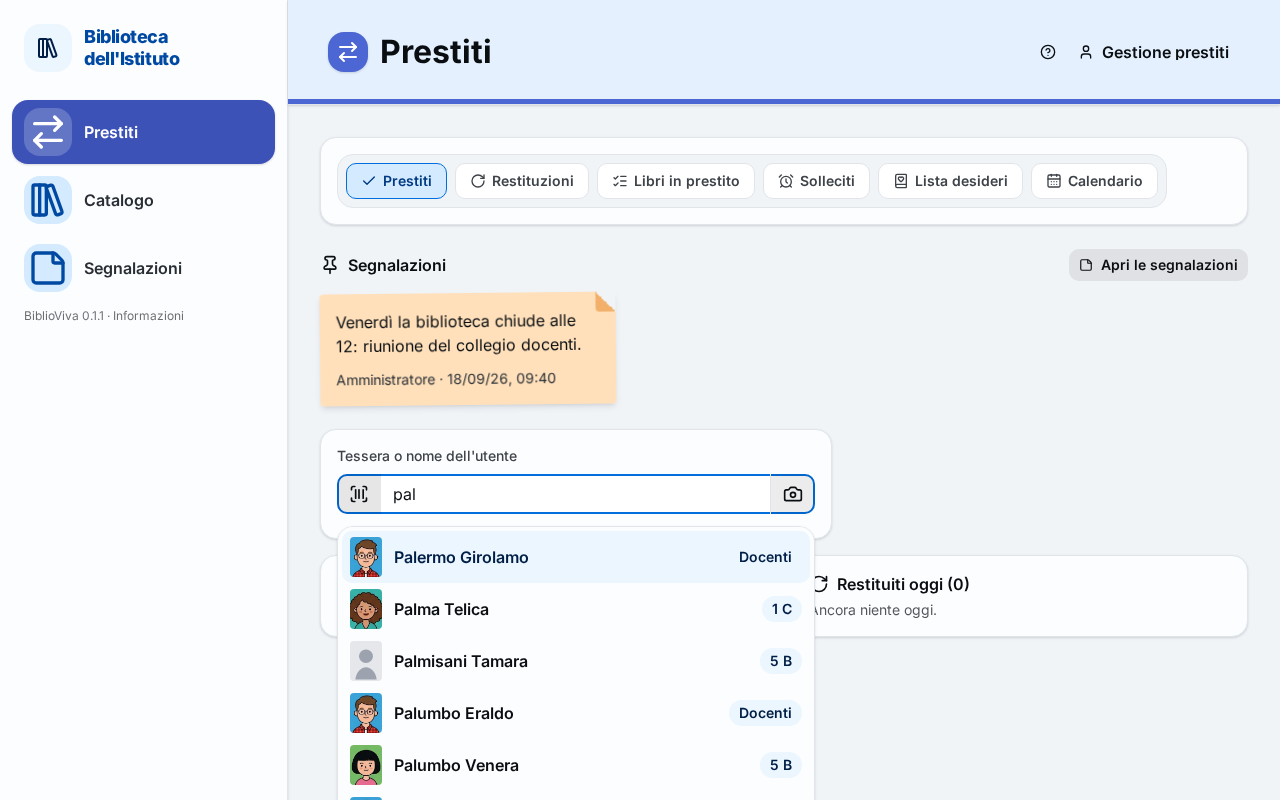
Figure 1. The list of patrons matching the name typed -
Check the class and the photograph in the list, and ask the patron for the full name if two people look alike.
-
Choose the patron with a click, or with the arrow keys and Enter. The patron's record opens and the field becomes Scan the book.
-
Read the books to lend, one after the other, as in Lend a book.
-
Press Done.
Note. The list shows at most eight patrons. If the one sought does not appear, add more letters to the surname.
Result
The loan is recorded as if the card had been read: same due date, same rules, same patron record.
Possible problems
Several patrons with the same surname
Tell them apart by the class (the badge next to the name) and by the photograph, or ask for the name. For teachers the class badge says Teacher.
The patron is not in the list
Check the spelling: the field also finds names typed with small mistakes, and marks them Similar. If the patron really is not there, they are not enrolled: enrolment is done by the "Cards and photos" account (Enrol a student, Enrol a teacher).
The card has been lost
The loan can still be recorded by typing the name. For a new card see Reprint a card.
The loan limit has been reached
The Loan limit reached window opens, as in Lend a book.