
Renew a loan
This page explains how to extend the due date of a book that the patron wants to keep longer. It is for staff at the circulation desk using the "Loan management" account. A loan can be renewed in three ways, depending on where the renewal starts.
- Time: less than a minute.
- Account: "Loan management" (also "Administration").
- Requirements: the patron's card, or the book, or the patron's name.
Procedure
From the circulation desk, with the card
-
Open Loans and read the patron's card. The books the patron has appear in the record, each with its due date.
-
Press Renew in the row of the book to renew. A message confirms the renewal with the new due date.
-
To renew all the patron's books at once, press Renew all (it appears when there is more than one book). The message says how many loans out of how many were renewed, and explains one by one those refused.
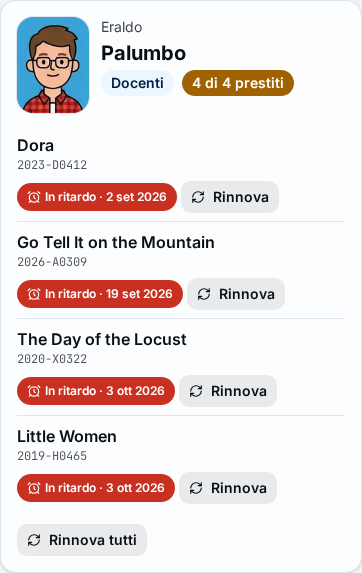
Figure 1. The patron's record with the Renew and Renew all buttons -
Press Done.
From returns, when the patron brings the book
- Open Returns and read the barcode of the book. The book is returned.
- Press Renew instead in the book's row. The loan is reopened and renewed: a message gives the new due date and the row shows "renewed until" with the date.
From Books on loan, for several patrons
- Open Books on loan and search for the loans, as in Check the books on loan.
- Select the rows to renew with the box on the left.
- Press Renew selected. The message says how many loans out of how many were renewed.
Result
The loan stays open with a new due date, counted with the loan rules and according to the school calendar. With the default settings the new due date starts from the date of the renewal, and up to five renewals are allowed for each book (only one for DVDs). The Renewals column of Books on loan counts those made.
Possible problems
The renewal messages are listed on the Loans page; here are the most frequent cases.
The book has already been renewed the maximum number of times
The message says how many times it has been renewed. The book has to be returned: press Return, which opens Returns with the book's barcode, then confirm with Enter.
Renewal is not allowed because the book is overdue
With the default rules an overdue book can be renewed too; if the administrator has changed the rule, the message says how many days late the book is. Press Return.
The due date is already the last loan day of the year
If the administrator has set a latest due date (for example the end of lessons), it cannot be exceeded. The message gives the date; press Return.
The administrator wants to renew anyway
For the "Administration" account, the messages of renewal not allowed also have Force (admin only) (not for the latest due date). The Force the renewal? window opens: write the Reason and press Renew anyway. The reason stays in the log.
Some books were not renewed
After Renew all or Renew selected, the first message counts the renewals that succeeded. Below it, a message for each refused book says why.
The patron is at the loan limit but wants another book
A renewal does not free a place: a return is needed. See Lend a book.